
У dbt можна додавати тести для важливих полів.
Список статей
- Спробуймо dbt. Частина 1 — пролог
- Спробуймо dbt. Частина 2 — перший запуск
- Спробуймо dbt. Частина 3 — seed і source
- Спробуймо dbt. Частина 4 — матеріалізація моделей
- Спробуймо dbt. Частина 5 — від Jinja до макросів і хуків
- Спробуймо dbt. Частина 6 — snapshots і analyses
- Спробуймо dbt. Частина 7 — тести
- Спробуймо dbt. Частина 8 — DAG і документація
- Спробуймо dbt. Частина 9 — змінні
- Спробуймо dbt. Частина 10 — пакети
- Спробуймо dbt. Частина 11 — SQLFluff і Pre-Commit
Тести в dbt
У dbt можна виконувати тести двох типів:
- Універсальні тести (Generic tests)
- Це попередньо визначені тести, які можна викликати так само просто, як макроси.
- Виконують перевірку конкретного поля моделі.
- Універсальні тести можна налаштовувати у YAML-файлах для різних об’єктів проєкту: моделей (models), джерел (sources), початкових таблиць (seeds) та знімків (snapshots).
- Одиничні тести (Singular tests)
- Це користувацькі запити, які можна проєктувати максимально гнучко та зі складною логікою.
- Виконують перевірки як окремих полів, так і зв’язків між кількома моделями.
- Одиничні тести створюються в директорії
tests/.
Запускати тестування можна двома командами:
dbt test— виконує лише тести.dbt build— виконує тести та збирає моделі, якщо тестування пройшло успішно.
У цій статті ми розглянемо тестування виключно на прикладі моделей.
Гаразд, почнімо!
Універсальні тести
Універсальні тести налаштовуються за допомогою чотирьох стандартних шаблонів «із коробки»: unique, not_null, accepted_values та relationships під ключем data_tests.
Далі ми розглянемо кожен із них, а також навчимося створювати власні універсальні тести.
Підготовка джерел і моделей
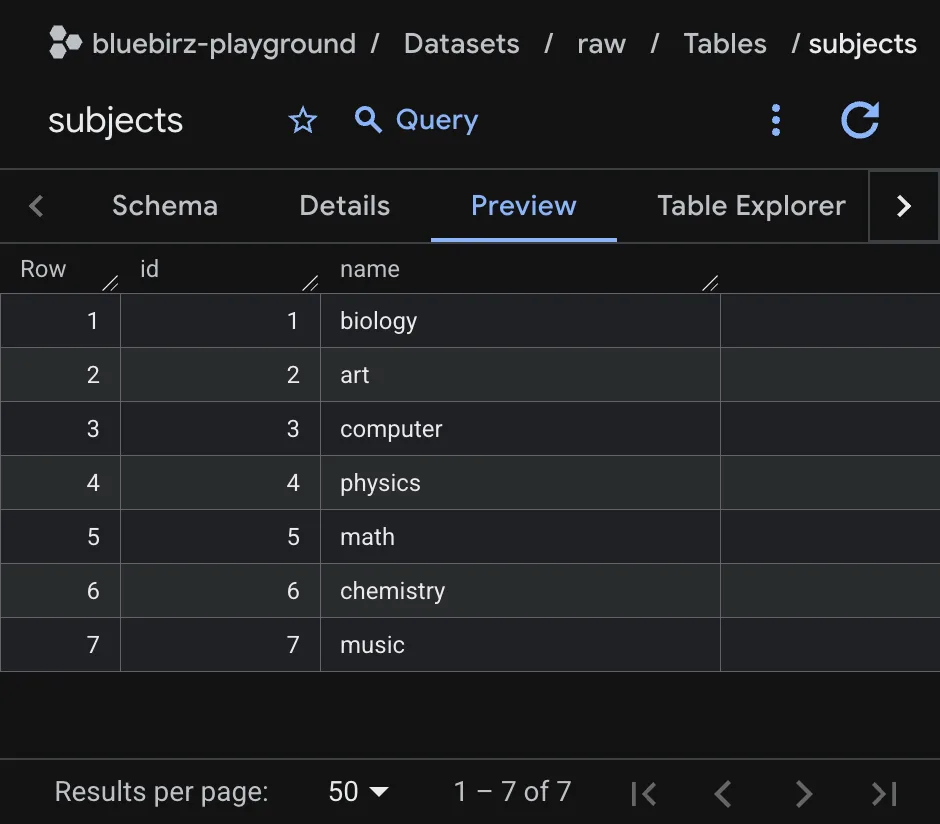
Припустімо, у нас є дві вихідні таблиці: student_grades та subjects, на яку посилається поле subject у таблиці student_grades, як показано нижче.
sources.yml
sources:
  - name: students
    schema: raw
    tables:
      - name: student_grades
        columns:
          - name: id
          - name: name
          - name: subject
          - name: grade
          - name: updated_at
  - name: subjects
    schema: raw
    tables:
      - name: subjects
        columns:
          - name: id
- name: namesтаблиця: student_grades
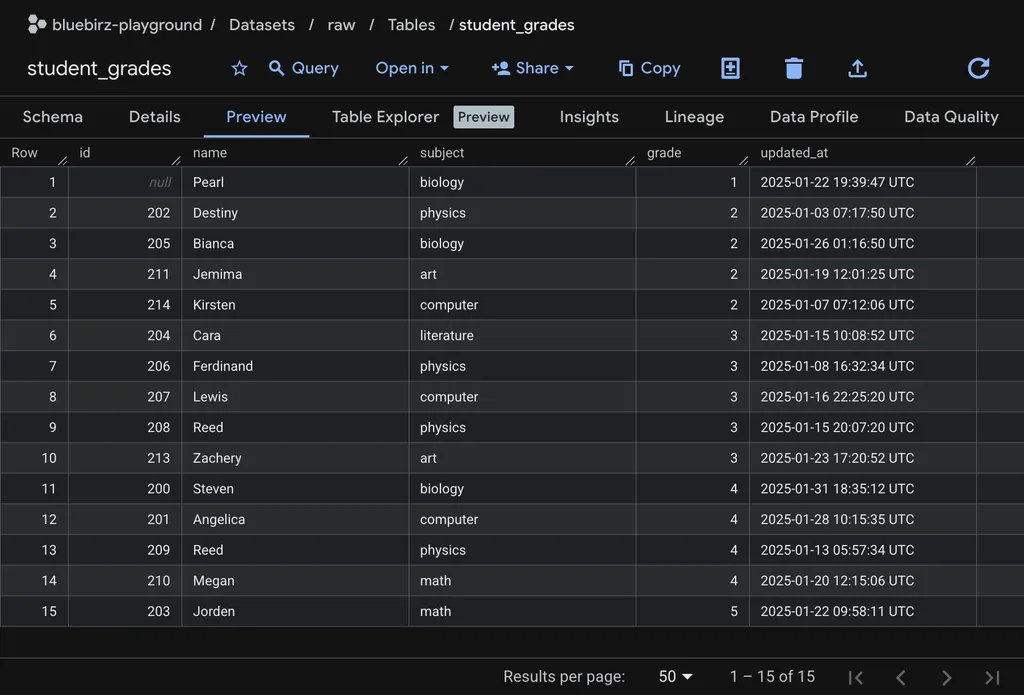
таблиця: subjects
У таблиці student_grades можна помітити кілька дивних значень:
- значення
idу першому рядку дорівнюєnull. - Ім’я «reed» зустрічається двічі.
- Зазначено предмет «literature», якого немає в таблиці
subjects. - В останньому рядку вказано оцінку «5», тоді як усі інші оцінки перебувають у межах 1–4.
Далі створімо просту модель-представлення (view) з назвою calc_grades, просто вибравши всі дані з student_grades.
calc_grades.sql
select * from {{ source("students", "student_grades") }}calc_grades.yml
models:
  - name: calc_grades
    config:
      materialized: view
      schema: transform
    columns:
      - name: id
      - name: name
      - name: subject
      - name: grade
- name: updated_atрезультат dbt run
Після виконання команди dbt run ми побачимо приблизно такий вивід:
21:54:02 Running with dbt=1.10.13
21:54:03 Registered adapter: bigquery=1.10.2
21:54:04 Found 7 models, 14 seeds, 8 data tests, 4 snapshots, 1 analysis, 5 sources, 510 macros
21:54:04
21:54:04 Concurrency: 1 threads (target='dev')
21:54:04
21:54:09 1 of 1 START sql view model transform.calc_grades .............................. [RUN]
21:54:11 1 of 1 OK created sql view model transform.calc_grades ......................... [CREATE VIEW (0 processed) in 1.45s]
21:54:11
21:54:11 Finished running 1 view model in 0 hours 0 minutes and 7.15 seconds (7.15s).
21:54:11
21:54:11 Completed successfully
21:54:11
21:54:11 Done. PASS=1 WARN=0 ERROR=0 SKIP=0 NO-OP=0 TOTAL=1Тепер додамо універсальні тести до нашої моделі-представлення.
тест: not_null
Тест not_null перевіряє, чи містить указане поле порожні значення (null).
синтаксис
models:
- name: <model_name>
columns:
- name: <column_name>
data_tests:
- not_nullприклад
models:
- name: calc_grades
config:
materialized: view
schema: transform
columns:
- name: id
data_tests:
- not_null
- name: name
- name: subject
- name: grade
- name: updated_atрезультат dbt test
21:56:32 1 of 1 START test not_null_calc_grades_id ...................................... [RUN]
21:56:34 1 of 1 FAIL 1 not_null_calc_grades_id .......................................... [FAIL 1 in 1.47s]
21:56:34
21:56:34 Finished running 1 test in 0 hours 0 minutes and 4.10 seconds (4.10s).
21:56:34
21:56:34 Completed with 1 error, 0 partial successes, and 0 warnings:
21:56:34
21:56:34 Failure in test not_null_calc_grades_id (models/students/calc_grades.yml)
21:56:34 Got 1 result, configured to fail if != 0
21:56:34
21:56:34 compiled code at target/compiled/dbt_proj01/models/students/calc_grades.yml/not_null_calc_grades_id.sql
21:56:34
21:56:34 Done. PASS=0 WARN=0 ERROR=1 SKIP=0 NO-OP=0 TOTAL=1фінальний тестовий запит
select id
from `bluebirz-playground`.`transform`.`calc_grades`
where id is nullтест: unique
Тест unique перевіряє, чи є в зазначеному полі дублікати значень.
синтаксис
models:
- name: <model_name>
columns:
- name: <column_name>
data_tests:
- uniqueприклад
models:
- name: calc_grades
config:
materialized: view
schema: transform
columns:
- name: id
- name: name
data_tests:
- unique
- name: subject
- name: grade
- name: updated_atрезультат dbt test
21:57:41 1 of 1 START test unique_calc_grades_name ...................................... [RUN]
21:57:42 1 of 1 FAIL 1 unique_calc_grades_name .......................................... [FAIL 1 in 1.43s]
21:57:42
21:57:42 Finished running 1 test in 0 hours 0 minutes and 4.15 seconds (4.15s).
21:57:42
21:57:42 Completed with 1 error, 0 partial successes, and 0 warnings:
21:57:42
21:57:42 Failure in test unique_calc_grades_name (models/students/calc_grades.yml)
21:57:42 Got 1 result, configured to fail if != 0
21:57:42
21:57:42 compiled code at target/compiled/dbt_proj01/models/students/calc_grades.yml/unique_calc_grades_name.sql
21:57:42
21:57:42 Done. PASS=0 WARN=0 ERROR=1 SKIP=0 NO-OP=0 TOTAL=1фінальний тестовий запит
with dbt_test__target as (
select name as unique_field
from `bluebirz-playground`.`transform`.`calc_grades`
where name is not null
)
select
unique_field,
count(*) as n_records
from dbt_test__target
group by unique_field
having count(*) > 1тест: relationships
Тест relationships перевіряє посилальну цілісність між моделями: кожне значення в полі поточної моделі має існувати у відповідному полі довідкової моделі.
синтаксис
models:
- name: <model_name>
columns:
- name: <column_name>
data_tests:
- relationships:
arguments:
to: <referent table using source() or ref()>
field: <field_name of referent table>приклад
models:
- name: calc_grades
config:
materialized: view
schema: transform
columns:
- name: id
- name: name
- name: subject
data_tests:
- relationships:
arguments:
field: name
to: source('subjects', 'subjects')
- name: grade
- name: updated_atрезультат dbt test
21:58:34 1 of 1 START test relationships_calc_grades_subject__name__source_subjects_subjects_ [RUN]
21:58:36 1 of 1 FAIL 1 relationships_calc_grades_subject__name__source_subjects_subjects_ [FAIL 1 in 1.40s]
21:58:36
21:58:36 Finished running 1 test in 0 hours 0 minutes and 3.90 seconds (3.90s).
21:58:36
21:58:36 Completed with 1 error, 0 partial successes, and 0 warnings:
21:58:36
21:58:36 Failure in test relationships_calc_grades_subject__name__source_subjects_subjects_ (models/students/calc_grades.yml)
21:58:36 Got 1 result, configured to fail if != 0
21:58:36
21:58:36 compiled code at target/compiled/dbt_proj01/models/students/calc_grades.yml/relationships_calc_grades_98611d65b006dbb31a361fa7d65fecc0.sql
21:58:36
21:58:36 Done. PASS=0 WARN=0 ERROR=1 SKIP=0 NO-OP=0 TOTAL=1фінальний тестовий запит
with child as (
select subject as from_field
from `bluebirz-playground`.`transform`.`calc_grades`
where subject is not null
),
parent as (
select name as to_field
from `bluebirz-playground`.`raw`.`subjects`
)
select
from_field
from child
left join parent
on child.from_field = parent.to_field
where parent.to_field is nullтест: accepted_values
Тест accepted_values визначає перелік допустимих значень, які може приймати конкретне поле.
синтаксис
models:
- name: <model_name>
columns:
- name: <column_name>
data_tests:
- accepted_values:
arguments:
values: <list of accepted values>
quote: <true|false if `values` is a string>приклад
models:
- name: calc_grades
config:
materialized: view
schema: transform
columns:
- name: id
- name: name
- name: subject
- name: grade
data_tests:
- accepted_values:
arguments:
values:
- 1
- 2
- 3
- 4
quote: false
- name: updated_atрезультат dbt test
21:59:30 1 of 1 START test accepted_values_calc_grades_grade__False__1__2__3__4 ......... [RUN]
21:59:32 1 of 1 FAIL 1 accepted_values_calc_grades_grade__False__1__2__3__4 ............. [FAIL 1 in 1.38s]
21:59:32
21:59:32 Finished running 1 test in 0 hours 0 minutes and 3.65 seconds (3.65s).
21:59:32
21:59:32 Completed with 1 error, 0 partial successes, and 0 warnings:
21:59:32
21:59:32 Failure in test accepted_values_calc_grades_grade__False__1__2__3__4 (models/students/calc_grades.yml)
21:59:32 Got 1 result, configured to fail if != 0
21:59:32
21:59:32 compiled code at target/compiled/dbt_proj01/models/students/calc_grades.yml/accepted_values_calc_grades_grade__False__1__2__3__4.sql
21:59:32
21:59:32 Done. PASS=0 WARN=0 ERROR=1 SKIP=0 NO-OP=0 TOTAL=1фінальний тестовий запит
with all_values as (
select
grade as value_field,
count(*) as n_records
from `bluebirz-playground`.`transform`.`calc_grades`
group by grade
)
select *
from all_values
where value_field not in (
1,2,3,4
)власні універсальні тести
Ми можемо створювати власні універсальні тести1, написавши макроси test у директорії tests/generic/ і викликавши їх у YAML-файлах.
Цього разу ми протестуємо дані й позначимо тест як провалений, якщо в таблиці є записи, у яких дата updated_at припадає на перші 5 днів місяця (включно з 5-м числом).
синтаксис: макрос тесту
{% test <test_macro_name>(model, column_name) %}
select {{ column_name }} as target_field
from {{ model }}
{# add where/join/group/etc. logic to fail the test #}
{% endtest %}синтаксис: конфігурація
models:
- name: <model_name>
columns:
- name: <column_name>
data_tests:
- <test macro name>приклад: макрос тесту
{% test no_update_first_5_days(model, column_name) %}
with
validation as (select {{ column_name }} as datetime_field from {{ model }}),
validation_error as (
select datetime_field
from validation
where extract(day from datetime_field) <= 5
)
select *
from validation_error
{% endtest %}приклад: конфігурація
models:
  - name: calc_grades
    config:
      materialized: view
      schema: transform
    columns:
      - name: id
      - name: name
      - name: subject
      - name: grade
      - name: updated_at
data_tests:
- no_update_first_5_daysрезультат dbt test
09:59:30  1 of 1 START test no_update_first_5_days_calc_grades_updated_at ................ [RUN]
09:59:33  1 of 1 FAIL 1 no_update_first_5_days_calc_grades_updated_at .................... [FAIL 1 in 2.86s]
09:59:33
09:59:33  Finished running 1 test in 0 hours 0 minutes and 7.03 seconds (7.03s).
09:59:33
09:59:33  Completed with 1 error, 0 partial successes, and 0 warnings:
09:59:33
09:59:33  Failure in test no_update_first_5_days_calc_grades_updated_at (models/students/calc_grades.yml)
09:59:33    Got 1 result, configured to fail if != 0
09:59:33
09:59:33    compiled code at target/compiled/dbt_proj01/models/students/calc_grades.yml/no_update_first_5_days_calc_grades_updated_at.sql
09:59:33
09:59:33 Done. PASS=0 WARN=0 ERROR=1 SKIP=0 NO-OP=0 TOTAL=1фінальний тестовий запит
with
        validation as (select updated_at as datetime_field from `bluebirz-playground`.`transform`.`calc_grades`),
        validation_error as (
            select datetime_field
            from validation
            where extract(day from datetime_field) <= 5
        )

    select *
from validation_errorОдиничні тести (Singular tests)
Одиничні тести2 — це користувацькі SQL-запити, створені для перевірки даних за нашою власною логікою.
Цього разу перевіримо: якщо з певного предмета є оцінка 1 або нижче, запит має вивести id та name усіх студентів, які мають оцінки з цих предметів.
Запишемо наш запит stem_under_grade_2.sql у директорію tests/ і виконаємо команду dbt test.
запит у папці tests
select id, name
from {{ ref("calc_grades") }}
where subject in ('biology', 'physics', 'computer', 'math')
qualify min(grade) over (partition by subject) <= 1результат dbt test
12:18:55  1 of 1 START test stem_under_grade_2 ........................................... [RUN]
12:18:58  1 of 1 FAIL 3 stem_under_grade_2 ............................................... [FAIL 3 in 3.01s]
12:18:58
12:18:58  Finished running 1 test in 0 hours 0 minutes and 6.81 seconds (6.81s).
12:18:58
12:18:58  Completed with 1 error, 0 partial successes, and 0 warnings:
12:18:58
12:18:58  Failure in test stem_under_grade_2 (tests/stem_under_grade_2.sql)
12:18:58    Got 3 results, configured to fail if != 0
12:18:58
12:18:58    compiled code at target/compiled/dbt_proj01/tests/stem_under_grade_2.sql
12:18:58
12:18:58 Done. PASS=0 WARN=0 ERROR=1 SKIP=0 NO-OP=0 TOTAL=1фінальний тестовий запит
 select
      count(*) as failures,
      count(*) != 0 as should_warn,
      count(*) != 0 as should_error
    from (


  select id, name
from `bluebirz-playground`.`transform`.`calc_grades`
where subject in ('biology', 'physics', 'computer', 'math')
qualify min(grade) over (partition by subject) <= 1


) dbt_internal_testПідсумок
- команди:
dbt test— запуск лише тестів.dbt build— запуск тестів і побудова моделей.
- універсальні тести:
- налаштовуються у YAML-файлах для моделей, джерел, початкових таблиць (seeds) та знімків (snapshots).
not_null— перевіряє наявність порожніх значень (null).unique— виявляє дублікати.relationships— перевіряє, чи не відсутні посилання на значення в довідковій таблиці.accepted_values— перевіряє, чи входять значення до заданого списку допустимих.- власні універсальні тести створюються за допомогою нового файлу запиту в директорії
tests/generic/із використанням синтаксису макросів{% test <test_macro_name>(model, column_name) %}...{% endtest %}.
- одиничні тести:
- створюються як нові файли із запитами в директорії
tests/.
- створюються як нові файли із запитами в директорії
Джерела
- Створення власних загальних тестів даних | dbt Developer Hub
- Окремі тести даних | Додавання тестів даних до вашого DAG | dbt Developer Hub
ОРИГІНАЛ СТАТТІ: Let’s try: dbt part 7 – tests
АВТОР СТАТТІ: bluebirz
Оригінал опубліковано під ліцензією CC BY 4.0. Цей матеріал є перекладом українською мовою.
Доєднуйтесь до наших спільнот 👇